Turn an Excel or CSV file into a Word report with tables, a chart and findings
For analysts, office teams and students who have the numbers and need the document. Attach the file; the totals are calculated by code and written into a .docx.
A Word report from this sales file: totals per product and per quarter, one chart, three findingsA Word report from this sales file: totals per product and per quarter, one chart, three findings
df = pd.read_csv(IN_DIR + '/shop-sales.csv')
df['revenue'] = df['units'] * df['unit_price_eur']
prod = df.groupby('product').agg(units=('units','sum'),
                                 revenue=('revenue','sum'))
doc = wg_docx.new_document(font_size=11)
doc.add_heading('Shop Sales Report 2026', level=1)
wg_docx.add_table(doc, rows, widths=[40,25,35])
doc.add_picture(OUT_DIR + '/chart.png')
wg_docx.save(doc, 'shop-sales-report.docx')
Output
product       units   revenue
Coffee beans   1858   26941.0
Filters        1677   10397.4
Grinder        1825   71175.0
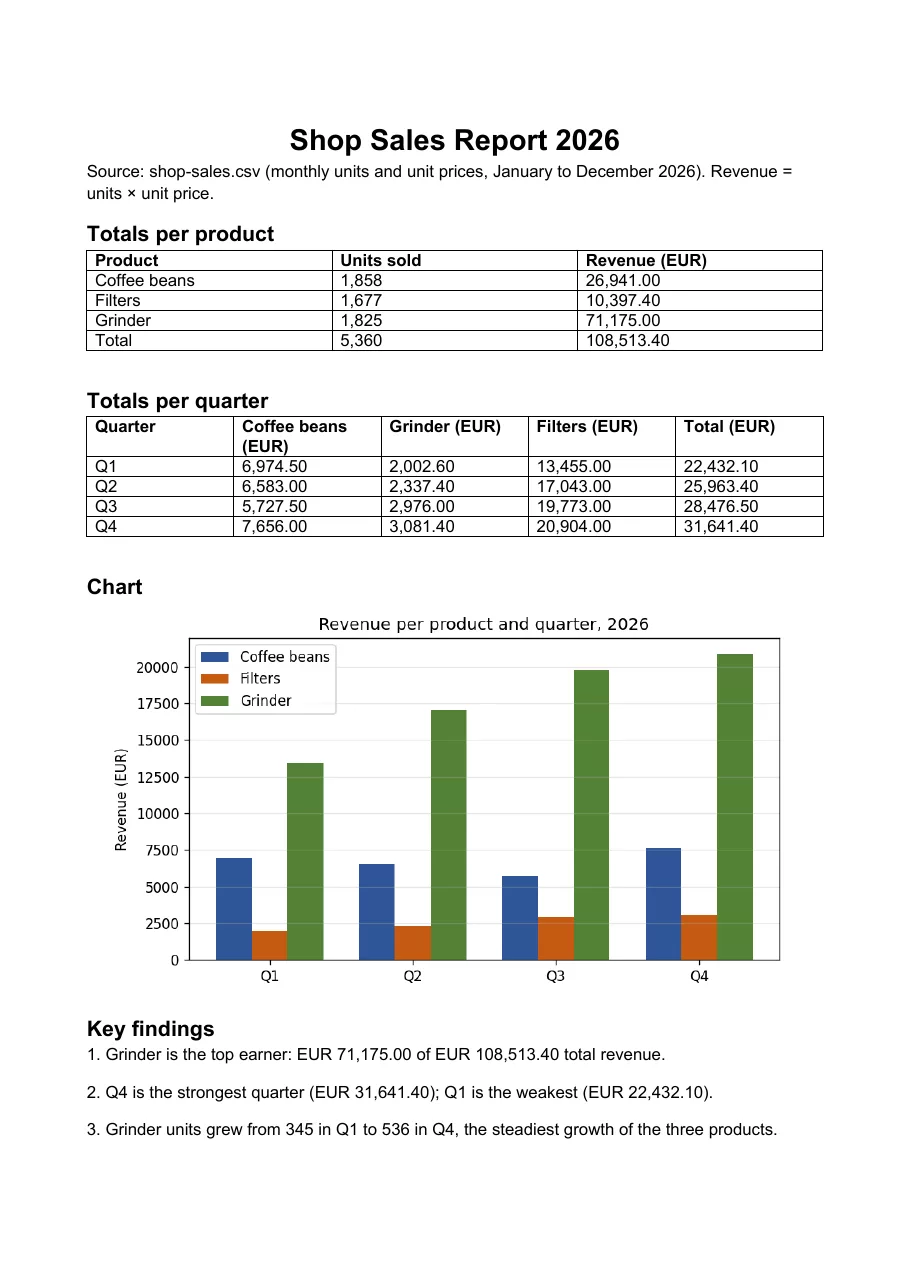
A real run on made-up data. See what came out:
Try one of these
Monthly sales report
Totals, the best product and a chart, ready to send.
Use thisExpense report
Spending by team and category, with the largest items.
Use thisSurvey results
Counts and percentages per question, with charts.
Use this
What you get
Numbers come from your file
The code reads the spreadsheet and calculates the totals, instead of a model guessing them.
A real .docx
Headings, tables and the chart are in a Word file you can edit.
Ask for changes
Say what to add or remove and the report is written again.
Need a designed report with a cover, layout check and a plan you approve first?
Questions
Which files can I attach?
Excel and CSV spreadsheets, and also text, JSON, PDF and Word files.
How does the report look?
Plain and print-ready: black headings, clear tables and the chart. For a designed layout, use the Pro Word report.
Is it free?
Your first analysis is free. After that, each run uses credits, which come with any paid plan or can be added from $5.
What happens to my file?
The code runs in an isolated sandbox with no internet access, and its temporary working files are removed after a short time. The files stay in your own account.